Friends suppose you went to your friend's house and he is using his PC and you said to him that - "Let me show you a trick". And then you disabled his mouse's right-click button or you created a hidden folder in his PC or you disabled his computer's shutdown, restart, sleep and hibernate buttons. Then imagine what will be his reaction, he will think that you have too much knowledge about computers and you are a professional computer user. This will increase your position within your friend circle when your friend will tell this to your other friends.

1. How to disable the right-click button of your mouse?
Follow the steps given below to disable the right-click button of your mouse :
1. Open the Registry Editor by clicking the Start button, typing regedit into the search box, and then pressing Enter
2. Browse to this location in the registry : HKEY_Current_User\Software\Microsoft\Windows\CurrentVersion\Policies\Explorer.
3. Change the value of NoViewContextMenu (In some computers NoViewContextMenu is also known as NoDriverTypeAutoRun.) to 1 by clicking on modify.
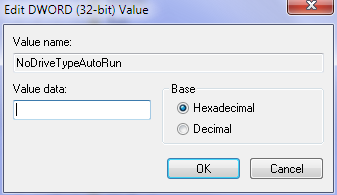
4. Now close the registry editor and restart your computer to see the effects.
Note: If you want to reverse the change then change the value of NoViewContextMenu to the normal value i.e. 91 (This value may differ in some computer's.)